Desk ergonomics on a budget: small changes that help
Reduce strain by varying posture and work rhythm. Position the screen at a comfortable viewing height, support feet and forearms, and take regular movement
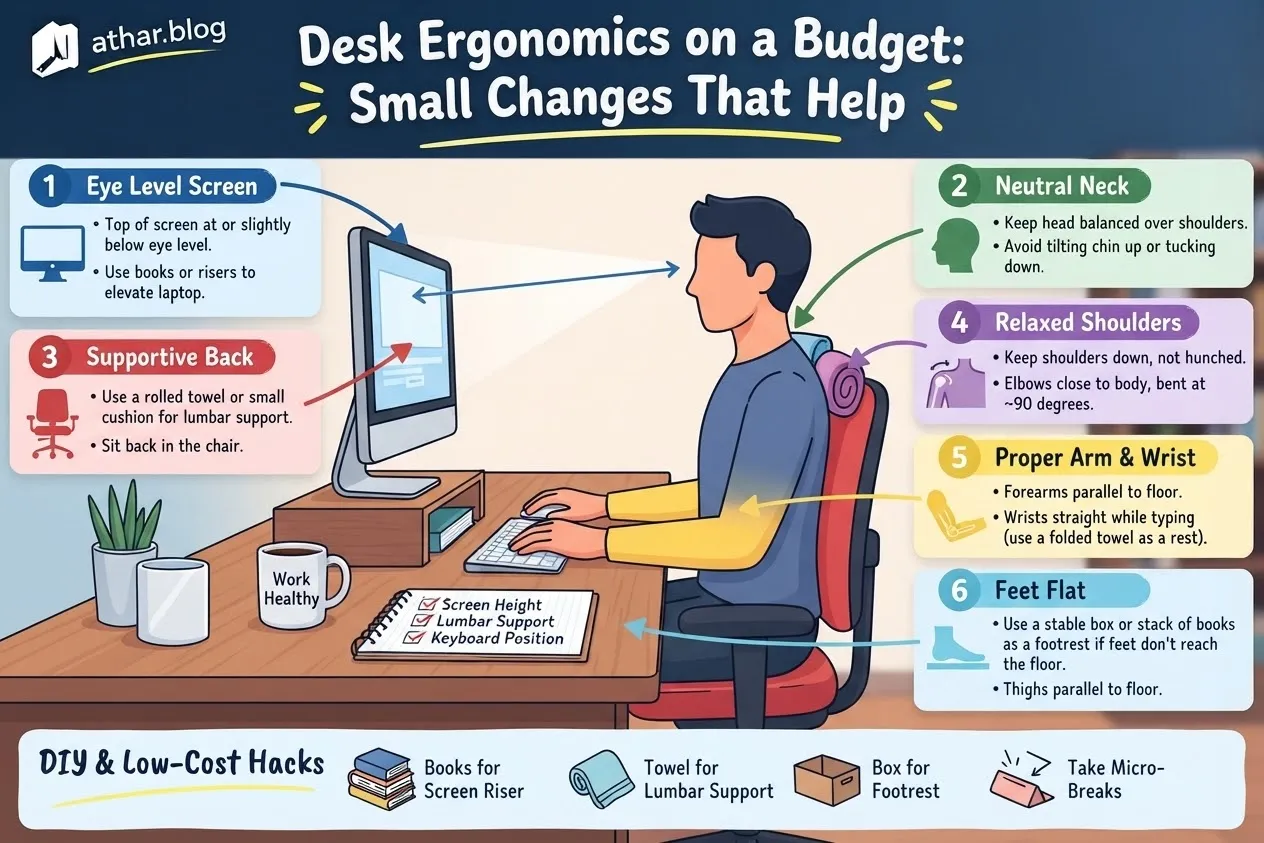
A productive workspace doesn't require a substantial financial investment; often, thoughtful, incremental adjustments yield significant benefits. The most effective approach to enhancing desk ergonomics, especially when constrained by a budget, involves clearly defining your objectives, understanding your current setup, and establishing measurable criteria for success. Rather than replicating an arbitrary ideal, the goal is to make informed, personalized choices that align with your specific needs and constraints, ultimately reducing physical strain and improving focus.
Defining Your Ergonomic Goals
Begin by articulating the precise outcome you wish to achieve. Formulate your desired result as a single, clear sentence. This clarity helps distinguish between tangible, measurable improvements and abstract aspirations. For instance, "reducing daily wrist discomfort" is a much more actionable goal than "having better ergonomics." Other examples might include "maintaining alert posture for three hours" or "eliminating neck stiffness by the end of the workday."
Identifying Current Practices and Baseline Data
Before implementing any changes, take an inventory of your existing work habits and physical setup. Document what currently works well, ensuring that these beneficial aspects are not inadvertently discarded. Crucially, meticulously record your current process and quantify any associated time, cost, or friction points. This forms a vital baseline against which you can later compare the impact of your adjustments. For example, if you experience lower back pain after two hours of sitting, that becomes a measurable data point. If you spend 15 minutes each morning adjusting your chair, that's a time metric to note. This initial assessment provides objective data, preventing subjective biases from clouding your evaluation.
Setting Measurable Outcomes
To truly gauge success, your goals must be measurable. This moves beyond simply "feeling better" to quantifiable improvements. For instance:
- Reduced discomfort: Track pain levels using a 1-10 scale before and after changes.
- Increased focus time: Monitor how long you can concentrate without discomfort or needing to shift positions.
- Frequency of breaks: Note how often you currently feel compelled to take a break due to physical strain, and aim to reduce this frequency.
- Specific symptom alleviation: If the goal is to reduce wrist strain, measure the duration or intensity of the strain.
Implementing Practical, Budget-Friendly Adjustments
The core principle of budget ergonomics is to focus on simple, high-impact changes that you can implement yourself. Rather than buying expensive equipment, consider how to optimize what you already possess.
Key Areas for Adjustment
Focus on fundamental ergonomic principles:
- Screen positioning: Ensure your monitor's top edge is at or slightly below eye level, and it's an arm's length away. This minimizes neck strain.
- Support for limbs: Feet should be flat on the floor or a footrest, and forearms should be parallel to the floor, supported by your desk or chair armrests when typing.
- Movement integration: Regular breaks are non-negotiable. No chair, however advanced, can compensate for prolonged static posture.
When contemplating multiple potential solutions, evaluate them against consistent criteria. These might include initial cost, the effort required for setup, long-term reliability, ease of reversal if it doesn't work, and any impact on others sharing the space. A simple spreadsheet comparing these factors can prevent costly missteps by revealing hidden trade-offs before you commit. Start with the least intrusive and most reversible change. If it delivers positive results, you can gradually refine or expand upon it; if not, you can pivot without significant loss.
Budget-Conscious Ergonomic Solutions
Here are some practical examples of inexpensive yet effective adjustments:
- Laptop users: Place your laptop on a stable stack of books, a sturdy box, or an inexpensive laptop stand to bring the screen to eye level. Combine this with an external keyboard and mouse (which can be found affordably) to maintain proper wrist and arm posture.
- DIY footrest: A sturdy cardboard box, a ream of paper, or even a stack of old magazines can serve as an effective footrest, ensuring your feet are comfortably supported and your knees are at roughly a 90-degree angle.
- Posture reminders: Use a simple timer or a free app to remind you to check your posture or take a micro-break every 30-60 minutes.
- Alternating positions: If a standing desk is out of budget, consider using a higher surface for short periods, like a kitchen counter or a tall dresser, to alternate between sitting and standing throughout the day.
- Chair modification: Add a rolled towel or small cushion to the lumbar curve of your existing chair for basic lower back support. Adjust armrests to ensure your forearms are supported when typing.
Pitfalls to Avoid and What to Observe
Even with the best intentions, certain pitfalls can derail ergonomic improvements. An expensive, feature-rich chair, for instance, cannot counteract the detrimental effects of remaining stationary for hours on end. The most sophisticated equipment pales in comparison to the benefits of regular movement and mindful posture.
Recognizing Warning Signs
Pay close attention to persistent physical signals. Enduring pain, numbness, tingling, or weakness in any part of your body warrants professional medical evaluation. Do not attempt to self-diagnose or self-treat severe or prolonged symptoms, as this could lead to worsening conditions. Always be particularly cautious of advice that overlooks financial implications, ignores individual contexts, or presents solutions with absolute certainty, as these are often indicators of oversimplified or misleading information.
The Value of Documentation
Maintain a log of your journey. Carefully record what worked and, equally important, what did not. A failed experiment is not a setback; it is valuable information that refines your understanding and informs future decisions. This objective record-keeping ensures that your subsequent choices are based on your own empirical evidence, rather than relying solely on generic success narratives that may not apply to your unique circumstances. If your ergonomic adjustments involve financial outlays, health considerations, legal obligations, or sensitive personal data, always verify relevant rules and seek qualified professional guidance when necessary.
Your Iterative Improvement Process
Initiate your ergonomic transformation by taking a side-view photograph of your current workspace. This visual perspective often highlights awkward reaches or sustained postures you might not consciously notice. Based on this observation, select one single, reversible adjustment to implement first.
Give yourself a defined, realistic review date—perhaps one week or two weeks out. On this date, revisit your initial baseline data. Compare your current physical sensations and work efficiency against your original notes. Ask yourself direct questions:
- Did this specific change address the core problem I identified?
- Am I experiencing less discomfort or working more efficiently?
- Do I feel more energized or focused?
Based on your evaluation, make an informed decision: continue with the change if it's beneficial, revise it if it has potential but needs tweaking, or abandon it if it didn't yield the desired outcome. Remember, substantial progress rarely comes from a single, dramatic overhaul. Instead, it typically emerges from a series of modest, carefully considered actions, iteratively refined over time. Keep meticulous notes throughout this process; your personal evidence is the most powerful tool for continuous improvement.
Related Articles

How Sleep Shapes Memory, Mood and Focus
What happens in your brain every night, and simple evidence-based habits to sleep better starting this week.
Building a Home Workout Routine With No Equipment
A balanced, progressive bodyweight plan you can follow in your living room, whatever your current fitness level.
Managing screen time with intentional digital habits
Replace automatic checking with deliberate choices. Identify which apps help you and which prompt mindless switching. Turn off nonessential alerts and create