Cloud backup for beginners: the three-copy rule
Make recovery the goal, not simply syncing folders. Keep your working copy, a local backup and an off-site copy. Schedule automatic backups, check version
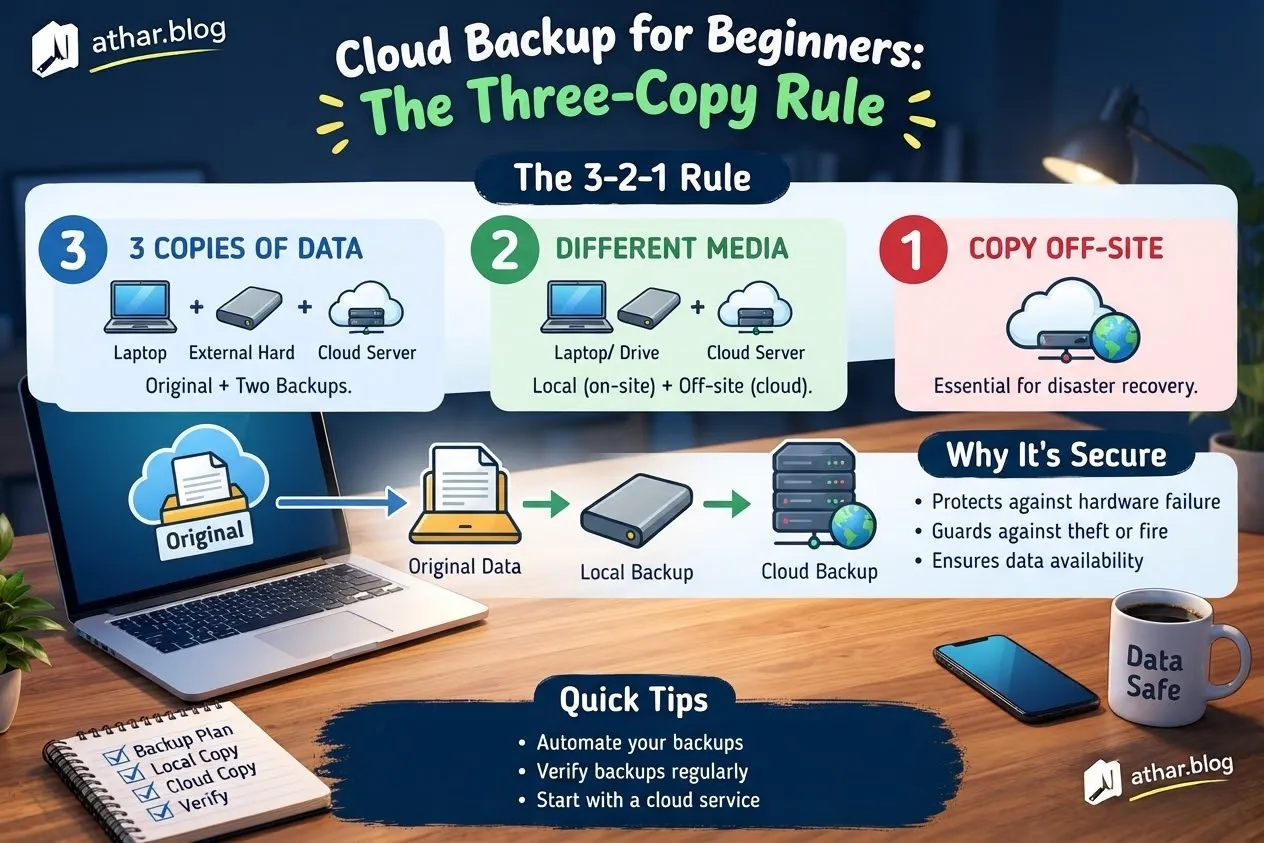
A truly effective guide begins not with a deluge of complex terminology, but with a clear, specific decision. Navigating the world of cloud backup, especially for newcomers, becomes much more manageable when approached through the lens of the "three-copy rule." The initial step is to identify precisely what aspects of your current data management need improvement, assess the resources you have at your disposal, and establish concrete metrics to determine the success of your new strategy. Crucially, the ultimate objective should be robust data recovery, not merely synchronizing files across devices. This isn't about blindly adopting someone else's workflow; it's about making a well-considered choice that aligns perfectly with your individual constraints and requirements.
Defining Your Data Protection Goals
Before embarking on any technical solution, articulate the desired outcome in a single, concise sentence. This clarity helps distinguish a measurable, tangible result from a vague aspiration. For instance, "reducing data loss incidents by 90%," "ensuring immediate access to critical documents during a system failure," or "maintaining uninterrupted operations even after a localized disaster" are precise goals. These differ significantly from general statements like "saving time" or "avoiding errors," which are beneficial but less specific in terms of backup strategy.
Assessing Your Current Landscape
Take stock of your current data management practices. What aspects are already performing well? Avoid discarding these functional elements without a compelling reason. Before implementing any changes, meticulously document your existing process, noting the time it consumes, the associated costs, and any points of friction or inefficiency. This provides an invaluable baseline against which you can objectively compare the results of your new approach. Without this foundation, it becomes difficult to truly evaluate the impact of your modifications.
Implementing the Three-Copy Rule
The cornerstone of a resilient backup strategy is the "three-copy rule." This principle dictates that you should always maintain at least three copies of your crucial data: your primary working copy, a local backup, and an off-site backup. This layered approach provides redundancy and protects against various failure scenarios.
The Components of the Three-Copy Rule
- Your Working Copy: This is the original data you actively use and modify on your primary device, such as your laptop, desktop computer, or server. While essential for daily operations, it's the most vulnerable to immediate threats like accidental deletion, hardware failure, or localized damage.
- Local Backup: This is a separate copy stored on a different device within your immediate environment. Examples include an external hard drive, a Network Attached Storage (NAS) device, or another computer on your local network. The advantage here is speed of recovery; you can quickly access data without relying on an internet connection. However, it remains susceptible to risks affecting your physical location, such as fire, flood, or theft.
- Off-Site Backup: This is a copy stored geographically distant from your primary location. Cloud backup services are the most common and convenient way to achieve this, but it could also be a physical drive stored at a friend's house or a safety deposit box. The off-site copy is critical for protection against catastrophic local events that could destroy both your working copy and local backup.
Practical Steps for Implementation
- Automate Your Backups: Relying on manual backups is prone to human error and inconsistency. Configure your chosen solutions to perform backups automatically on a regular schedule (e.g., daily, hourly for critical files).
- Verify Version History: Ensure your backup solution retains multiple versions of files. This allows you to revert to an earlier state if a file becomes corrupted or you accidentally save unwanted changes.
- Test Your Restoration Process: The most overlooked, yet vital, step. Regularly practice restoring files to confirm that your backups are viable and that you understand the recovery procedure. A backup is only as good as its ability to restore data.
When evaluating different backup options (e.g., various cloud providers, types of external drives), compare them using consistent criteria. Consider factors such as:
- Cost: Initial investment and ongoing subscription fees.
- Effort to Set Up: Complexity of installation and configuration.
- Reliability: Track record of the service or hardware.
- Reversibility: Ease of migrating data out if you switch providers.
- Impact on People: How does it affect others who rely on your data?
A simple written comparison often illuminates trade-offs, preventing costly mistakes. Begin with the most basic useful version of your plan. If it proves effective, refine and expand it; if not, you can pivot without significant loss of time or resources.
Real-World Examples and Pitfalls to Avoid
Illustrative Scenario: A Freelance Designer
Consider a freelance graphic designer. Their working copy resides on their high-performance workstation, essential for daily project work. A local backup is configured to run nightly to an external SSD connected via USB, providing fast access to recent files. For the off-site copy, they use a cloud storage service, syncing their project folders encrypted, ensuring protection against studio theft or a major hard drive failure. Once a month, they practice restoring a project folder from the cloud to a different device to confirm the integrity of the backup and their restoration procedure. This ensures they can confidently meet client deadlines even if disaster strikes their primary machine.
Understanding Sync vs. Backup
A critical distinction for beginners: A synchronization service (like Dropbox, Google Drive, or OneDrive without specific backup features enabled) is not a complete backup solution on its own. While excellent for accessibility and collaboration, sync services rapidly mirror changes, including accidental deletions, file corruption, or ransomware encryption. If a file is deleted from your device, it's often deleted from the cloud. For true recovery, look for features like versioning, deleted file retention, and point-in-time recovery.
Common Misconceptions and Red Flags
Be particularly cautious of advice that omits crucial details such as actual costs, specific contexts, or acknowledges inherent uncertainties. Document both successes and failures; a missed target offers valuable information, not merely a reason to abandon your strategy. If your data involves financial records, health information, legal documents, or other sensitive personal data, always verify compliance with relevant local regulations (e.g., GDPR, HIPAA) and seek qualified professional advice when necessary.
Your Actionable Next Steps
To move forward, begin by identifying your most critical data folders. This week, perform a small restoration test from your current backup method (even if it's just copying files to another location) to ensure you understand the process and that the files are intact.
- List your crucial data:
- Documents (e.g., contracts, financial records, personal writings)
- Photos and Videos (e.g., family archives, professional portfolios)
- Work Projects (e.g., code, designs, research)
- Configuration files and settings for critical applications
- Choose a restoration test: Select a non-critical but representative file or small folder.
- Execute the test: Restore the chosen item to a new, temporary location, then verify its integrity.
- Schedule a review: Mark a date on your calendar, perhaps 3-4 weeks from now, to revisit your backup strategy.
At your review, compare your experience with your initial baseline documentation. Did the changes address your original problem? Based on your findings, decide whether to continue with your current approach, revise it based on new insights, or explore entirely different options. Consistent progress often stems from modest, carefully executed actions rather than singular, dramatic decisions. Maintain detailed notes throughout this process. Your own documented evidence will be far more valuable for informing future choices than any generic success story.
Related Articles

أدوات الذكاء الاصطناعي لصنّاع المحتوى العرب: دليل عملي ومسؤول
كيف يستفيد صانع المحتوى العربي من أدوات الذكاء الاصطناعي في البحث والتنظيم والتدقيق دون أن يفقد أصالته أو ثقة جمهوره.
Passkeys Explained: How to Replace Your Passwords Safely
What passkeys are, why they resist phishing, and a step-by-step plan to switch your email, bank and social accounts without getting locked out.

أفضل بدائل ChatGPT المجانية في 2026: مقارنة شاملة بين Claude وGemini وDeepSeek
مقارنة شاملة لأفضل بدائل ChatGPT المجانية في 2026: اكتشف الفروق بين Claude وGemini وDeepSeek لاختيار الأداة الأقوى في الكتابة، التحليل، والبرمجة باحترافية.