A Healthy Routine for Desk Workers: Posture, Movement and Energy
Simple, evidence-informed habits to reduce stiffness, eye strain and fatigue when you sit at a computer most of the day.
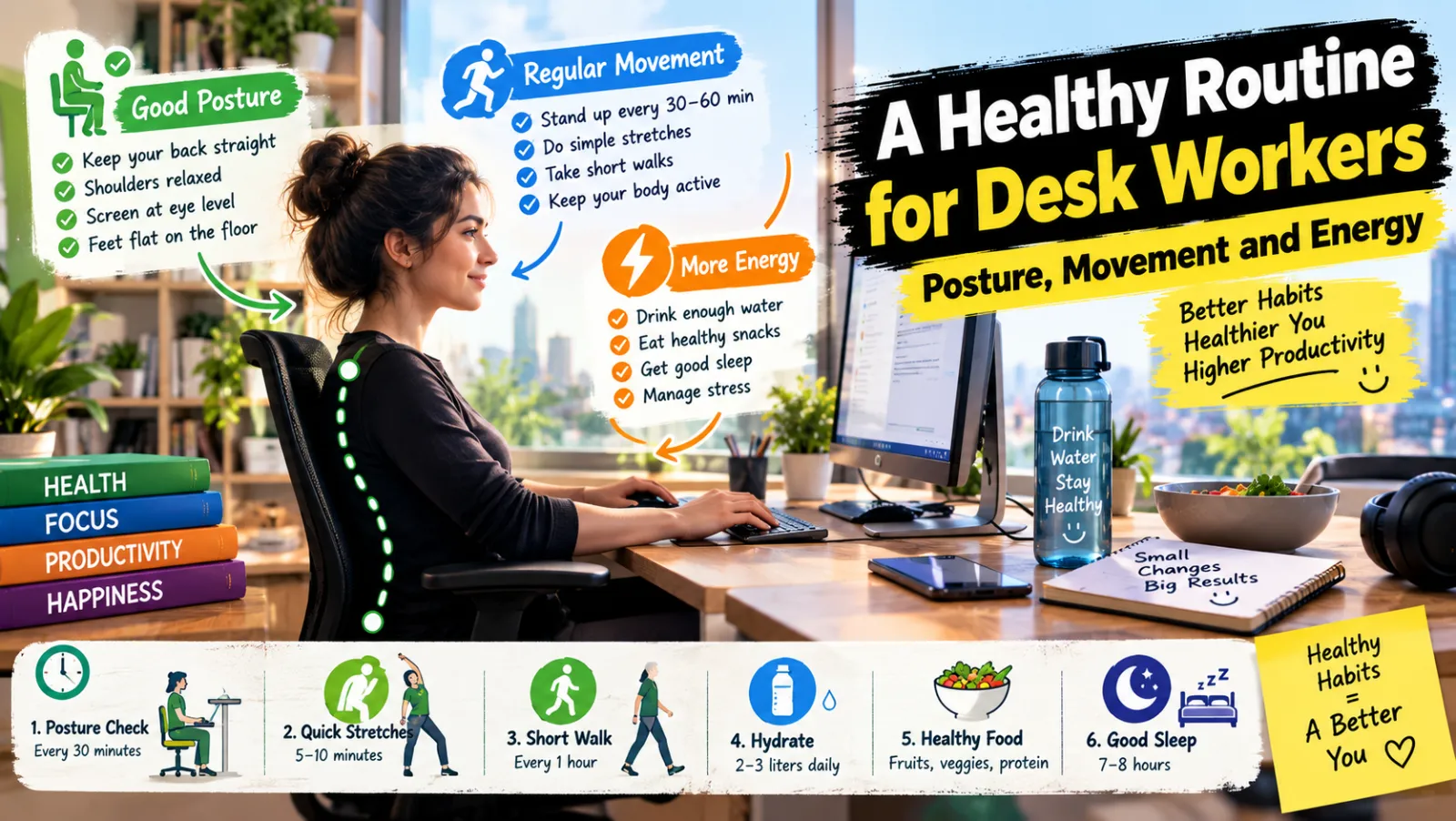
Movement and wellness are crucial for individuals spending extended periods at a desk. While modern work often necessitates sitting, the primary concern isn't the act of sitting itself, but rather the prolonged inactivity it can induce. Extended periods without movement contribute significantly to physical stiffness, exacerbate back discomfort, and can lead to a noticeable dip in energy levels. The overarching objective isn't to maintain an unattainable "perfect" posture throughout the day, but rather to cultivate a dynamic approach that incorporates frequent changes in position and regular movement breaks. This proactive strategy helps mitigate the negative impacts of sedentary work, fostering greater comfort and sustained vitality.
Optimizing Your Workspace Ergonomics
A well-configured workstation is foundational to maintaining physical comfort and reducing strain. Strategic setup can significantly influence your posture and overall well-being throughout the workday.
Positioning Your Monitor and Keyboard
The monitor should be positioned directly in front of you, with the top edge of the screen at or slightly below eye level. This prevents excessive neck craning upwards or looking downwards. The distance from your eyes to the screen should be approximately an arm's length (around 20-28 inches or 50-70 cm) to minimize eye strain.
For laptop users, a dedicated laptop stand is highly recommended. This elevates the screen to an appropriate height, but necessitates the use of a separate external keyboard and mouse. Using a laptop's built-in keyboard and trackpad when it's elevated forces an awkward wrist and arm position, counteracting the benefits of the elevated screen.
Supporting Your Body
Your chair plays a critical role in supporting your posture. Ensure your feet are flat on the floor or comfortably rested on a footrest. This allows your knees to be roughly level with or slightly below your hips, promoting an open hip angle. Your elbows should remain close to your body, forming an angle of approximately 90-100 degrees when typing. This helps prevent shoulder and wrist strain. If your chair has armrests, adjust them so they lightly support your forearms, taking pressure off your shoulders without forcing them upwards.
- Practical Steps for Setup:
- Chair Adjustment: Adjust chair height so feet are flat or on a footrest, knees at hip level.
- Monitor Height: Raise or lower your monitor (or use a stand) until the top of the screen is at eye level.
- Distance: Position the monitor an arm's length away.
- Keyboard/Mouse: Place them directly in front of you, close enough to keep elbows at a comfortable angle.
- Lighting: Ensure adequate, glare-free lighting.
Integrating Regular Movement Throughout the Day
Breaking up sedentary periods is paramount. Aim to incorporate movement breaks every thirty to sixty minutes. These brief interruptions can significantly alleviate stiffness, improve circulation, and re-energize your mind.
Simple Movement Strategies
- Stand and Stretch: Every hour, stand up, take a few steps, and perform a gentle full-body stretch.
- Hydration Walks: Use trips to refill your water bottle as opportunities for a short walk away from your desk.
- Standing Calls: Take phone calls or participate in virtual meetings while standing. Consider investing in a standing desk converter if you find yourself taking many calls or need to switch positions frequently.
- Walk Breaks: Instead of messaging a colleague, walk over to their desk (if feasible and appropriate).
- Automated Reminders: Utilize a timer or a reminder application on your computer or phone to prompt you to move. This consistent cue helps establish a new habit.
Here are some ideas for quick breaks:
- Walk to the furthest restroom.
- Do a lap around your office floor.
- Perform 10-15 squats or lunges.
- Stretch your arms overhead and twist gently.
- Stand up and down from your chair 5-10 times.
Safeguarding Your Vision and Eye Health
Digital eye strain is a common complaint among desk workers. Protecting your eyes is crucial for long-term comfort and productivity.
The 20-20-20 Rule and Beyond
A highly effective strategy is the "20-20-20" rule: every 20 minutes, shift your gaze to something approximately 20 feet away for at least 20 seconds. This simple act allows your eye muscles to relax and refocus, reducing strain.
Other important considerations include:
- Screen Brightness: Adjust your monitor's brightness to match the ambient lighting of your room. An overly bright or dim screen can cause fatigue.
- Blinking: Consciously blink more often. When staring at a screen, people tend to blink less frequently, leading to dry eyes.
- Anti-Glare: Consider an anti-glare screen protector or adjusting light sources to minimize reflections on your screen.
- Breaks: Take longer breaks from the screen every few hours. Step away, look out a window, or close your eyes for a few minutes.
Incorporating Simple Desk Stretches
Regular micro-stretches at your desk can prevent muscle tension from accumulating. These should be performed gently and without pain.
- Shoulder Rolls: Slowly roll your shoulders backward in a circular motion 5-10 times, then reverse direction. This eases tension in the upper back and neck.
- Neck Tilts: Gently tilt your head to one side, bringing your ear towards your shoulder. Hold for 15-20 seconds, then repeat on the other side. Avoid forcing the movement.
- Chest Stretch: Stand or sit tall, clasp your hands behind your back, and gently lift them slightly away from your body, opening up your chest. This counteracts the hunched posture often adopted when typing.
- Hip Flexor Stretch: Stand up, place one foot slightly forward, and gently lean forward into the front leg, feeling a stretch in the front of the hip of the back leg. This is particularly beneficial as prolonged sitting shortens the hip flexors.
- Wrist and Finger Stretches: Extend one arm forward, palm up, and use your other hand to gently pull your fingers back towards your body, stretching the forearm. Repeat with the palm down.
Always move slowly and deliberately. If you feel any sharp pain, stop immediately. These stretches are designed for gentle relief, not intense exertion.
Sustaining Energy Through Nutrition and Hydration
What you consume significantly impacts your energy levels and ability to concentrate. Fueling your body appropriately can help avoid the dreaded mid-afternoon slump.
Smart Food and Drink Choices
- Hydration: Drink water consistently throughout the day. Dehydration can manifest as fatigue and reduced cognitive function. Keep a water bottle within reach and refill it frequently.
- Balanced Meals: Opt for meals rich in protein, complex carbohydrates, and fiber. Examples include lean meats, fish, legumes, whole grains, and a variety of vegetables. These provide a sustained release of energy, unlike sugary foods that cause a rapid spike and subsequent crash.
- Strategic Snacking: Keep healthy snacks nearby to ward off hunger and maintain steady blood sugar levels. Good options include nuts, seeds, fresh fruit, Greek yogurt, or vegetable sticks with hummus. Avoid relying on highly processed or sugary snacks, which offer only temporary energy boosts.
Enhancing Well-being Beyond the Workday
Your activity levels outside of work hours are equally vital for holistic health and counteracting the effects of a sedentary job.
Prioritizing Physical Activity
Aim for at least 150 minutes of moderate-intensity aerobic activity or 75 minutes of vigorous-intensity aerobic activity per week, coupled with muscle-strengthening activities on two or more days, as recommended by health guidelines.
- Regular Walking: Integrate brisk walks into your daily routine. This could be during your lunch break, after work, or even by parking further away from your destination.
- Strength Training: Incorporate strength exercises two to three times a week. This builds muscle mass, supports skeletal health, and improves metabolic rate. Examples include bodyweight exercises, lifting weights, or resistance band workouts. Consult your doctor before starting any new exercise regimen, especially if you have underlying health conditions. This ensures the activities are appropriate and safe for you.
When Professional Medical Advice is Necessary
While these strategies offer general guidance for enhancing comfort and well-being at the desk, they are not a substitute for professional medical consultation. If you experience persistent pain, numbness, tingling sensations, or any other concerning symptoms, it is crucial to consult a healthcare professional. These symptoms could indicate underlying conditions that require specific diagnosis and treatment. This guide provides general information and is not intended to offer medical advice.
Related Articles:

Building a Home Workout Routine With No Equipment
A balanced, progressive bodyweight plan you can follow in your living room, whatever your current fitness level.
How Sleep Shapes Memory, Mood and Focus
What happens in your brain every night, and simple evidence-based habits to sleep better starting this week.
Screen Time and Mental Health: Evidence-Based Habits for a Healthier Digital Life
What research suggests about screens, sleep and mood, plus practical habits to reduce digital overload without quitting technology.